
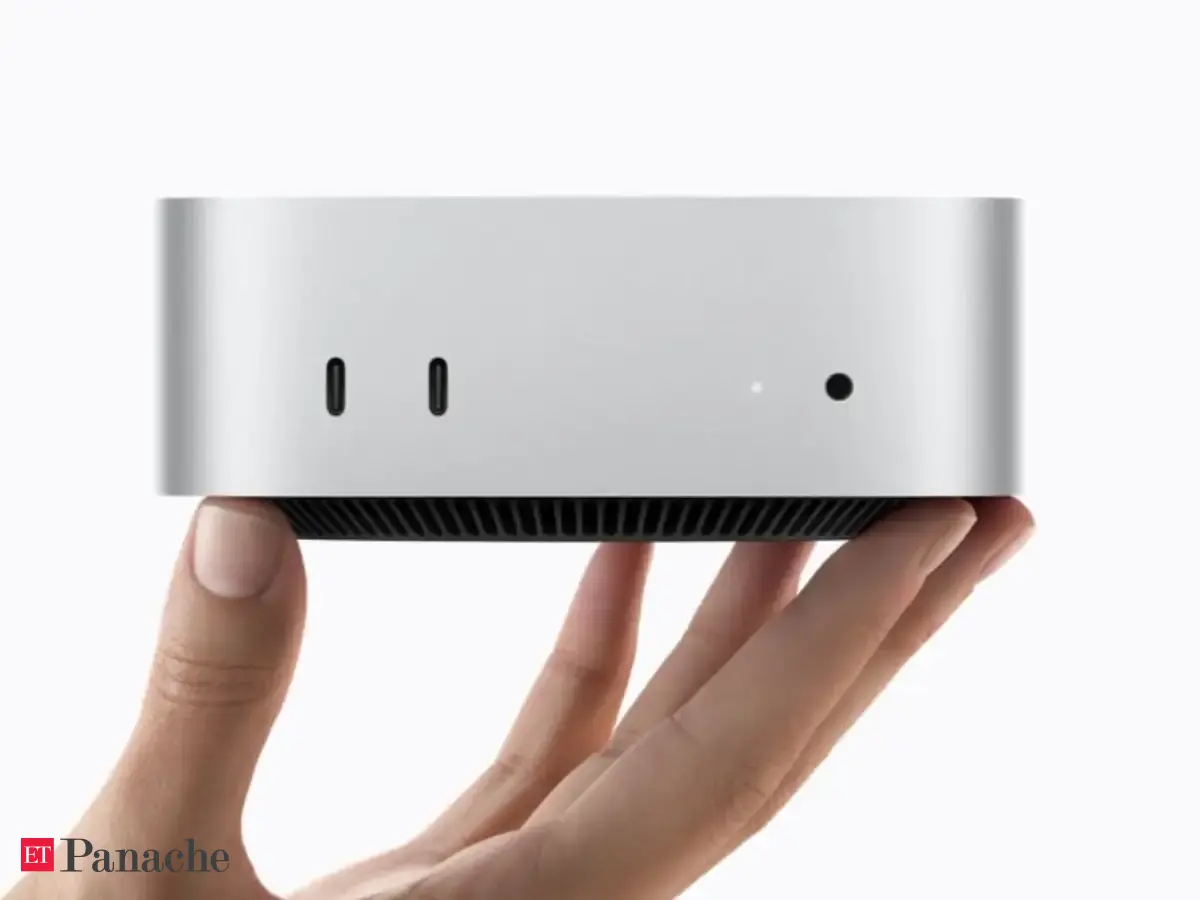
ആപ്പിളിന്റെ പുതിയ മാക് മിനി M6 കരുത്തുറ്റ പ്രകടനവും ഒതുക്കമുള്ള രൂപകൽപ്പനയും കൊണ്ട് ശ്രദ്ധേയമാകുന്നു. വീഡിയോ എഡിറ്റിംഗ്, AI ടൂളുകൾ, മൾട്ടിടാസ്കിംഗ് എന്നിവയ്ക്ക് ഇത് മികച്ചതാണ്. ഇന്ത്യയിൽ 99,900 രൂപ മുതലാണ് വില ആരംഭിക്കുന്നത്. എന്നാൽ മോണിറ്റർ, കീബോർഡ് തുടങ്ങിയവയ്ക്കായി അധിക തുക ചെലവാക്കേണ്ടി വരുമെന്ന കാര്യം ഉപയോക്താക്കൾ പ്രത്യേകം ശ്രദ്ധിക്കേണ്ടതുണ്ട്.
Apple's Mac mini M6 packs powerful performance into a compact desktop, but is it the right choice for creators and professionals? From 4K video editing and multitasking to experimenting with local AI models and tools such as ChatGPT and dots, the machine offers plenty of possibilities. However, its starting configuration comes with limitations that buyers should consider before investing.
Apple's Mac mini has become one of the most compelling computers in its lineup. Even after the price increase, it continues to deliver strong performance for its size and cost. For creators and professionals, it offers a capable desktop without the expense of a Mac Studio or Mac Pro.
The new Mac mini M6 builds on that proposition with improved processing, graphics and AI capabilities. But beyond conventional computing, we wanted to explore two areas: video editing and running AI-powered workflows using tools such as ChatGPT and its personal agent, dots.
Price and availabilityThe Mac mini M6 starts at Rs 99,900 in India, with education pricing beginning at Rs 88,900. The base configuration offers 16GB of unified memory and 256GB of SSD storage, with upgrades available for both.
However, the price does not include a monitor, keyboard or mouse. For existing desktop users, this may not be an issue, but first-time buyers will need to factor in these additional costs.
Design and connectivityThe Mac mini's biggest advantage remains its compact design. It occupies very little desk space while offering the capabilities of a full desktop computer.
The aluminium enclosure looks minimal, and the selection of ports is practical. There are two USB-C ports and a headphone jack at the front, while the rear houses three Thunderbolt 4 ports, HDMI and Ethernet.
And no, you don't have to necessarily buy expensive monitors to start using it or accessories. You can plug it in with your existing set-up. However we do prefer using it on the Studio XDR display.
For creators, the Thunderbolt ports are particularly useful for connecting external SSDs, displays and accessories. However, the absence of an SD card reader means camera users will still require an adapter.
PerformanceThe Mac mini M6 comes with a 12-core CPU, 12-core GPU and a dual 16-core Neural Engine. It also includes dedicated hardware acceleration for formats such as H.264, HEVC, ProRes and ProRes RAW.
For everyday computing, there is more than enough processing power for multitasking, browsing, documents, video meetings and productivity applications.
The real advantage becomes apparent when multiple applications are involved. A typical creator's workflow may include video editing software, several browser tabs, ChatGPT, cloud storage and communication applications running simultaneously.
Apple's unified memory architecture helps manage these workloads efficiently. However, while the base 16GB configuration should be sufficient for regular users, professionals working with heavier projects should consider additional memory. In our review unit, we had the 24GB memory, which allowed us to experiment across three important factors. Video editing, running models and everyday workflows.
Video editing: A capable machine for creatorsVideo editing is one of the strongest reasons to consider the Mac mini M6.
For creators producing YouTube videos, Instagram Reels or interviews, the machine offers the processing capabilities required for 4K editing. Its dedicated media engine is particularly useful when working with supported video formats.
Applications such as Adobe Premiere Pro and Final Cut Pro can benefit from hardware-accelerated decoding and encoding, especially when handling footage from smartphones and mirrorless cameras.
For a typical short-form video involving multiple clips, audio tracks, captions, transitions and colour correction, the M6 is well positioned to handle the workload.
However, editing becomes more demanding with multiple 4K streams, heavy effects, noise reduction or complex colour grading. Professionals regularly working with 6K or 8K footage may benefit from higher-end configurations.
Storage is another limitation. The base 256GB SSD can fill up quickly with video projects. We would recommend investing in a fast external SSD rather than relying entirely on internal storage.
For individual creators and small production teams, the Mac mini M6 makes a strong case as a primary editing workstation, although actual timeline smoothness and export speeds will depend on the project.
AI agents: Running ChatGPT and dotsOne of the more interesting developments in computing is the shift from AI chatbots to AI agents.
Unlike traditional chatbots that primarily respond to questions, agents can work on tasks, conduct research, organise information and interact with supported applications.
We looked at this through ChatGPT and dots, OpenAI's personal AI agent designed to work on ongoing tasks.
For journalists and content creators, the possibilities are useful. An agent can help research an upcoming launch, organise information, prepare summaries and assist with planning content. This can complement a workflow where the actual video production and editing happen on the Mac mini.
However, there is an important distinction. Dots primarily operates through cloud infrastructure, meaning its intelligence does not run directly on the M6 chip.
Therefore, a faster processor does not automatically mean faster responses from dots. The Mac mini's performance becomes more relevant when handling local files, applications and other tasks that require processing on the device.
For users who combine conventional desktop applications with AI-assisted workflows, the Mac mini provides a capable environment without requiring a substantially larger workstation.
On-device AIBeyond cloud-based agents, the M6 also offers improvements for AI workloads processed locally.
Its Neural Engine and GPU architecture can support compatible applications involving transcription, image processing and smaller local language models.
This can be particularly useful for creators working with audio recordings, generating transcripts or processing content without necessarily uploading every file to the cloud.
However, local AI models can consume significant memory. While 16GB is sufficient for everyday computing and smaller workloads, users planning to experiment extensively with local AI should consider 24GB or 32GB.
It is also worth remembering that unified memory cannot be upgraded after purchase.
Thermal performance and efficiencyAnother advantage of Apple's silicon architecture is power efficiency.
The Mac mini delivers substantial processing capabilities in a compact enclosure without the size and power requirements associated with many traditional desktop workstations.
This is useful for creators working in smaller spaces, particularly when editing audio or recording voiceovers.
However, sustained workloads such as repeated video exports can place greater demands on cooling. Fan noise and sustained performance remain important considerations for anyone planning to use the machine extensively.
Should you buy the base model?The base Mac mini M6 offers considerable value for users primarily working with documents, browsing, office applications and occasional creative tasks.
For professional video editors, we would recommend considering at least 24GB of unified memory. The additional headroom can be useful when editing footage while running several applications in the background.
External SSD storage is a practical alternative to paying for larger internal storage configurations.
For heavier editing projects or local AI experimentation, the 32GB configuration makes more sense.
VerdictThe Mac mini M6 continues to offer a compelling balance of performance, size and price. For creators editing 4K videos, managing multiple applications and working with AI tools, it has the potential to serve as a capable primary desktop without requiring an investment in Apple's more expensive machines.
However, the base 256GB storage is restrictive, and professional users should consider upgrading the memory. AI agents such as dots add another dimension to the workflow, although their cloud-based processing does not directly benefit from the M6's additional power. For most creators, the Mac mini M6 remains a practical investment, provided they choose the right configuration.