
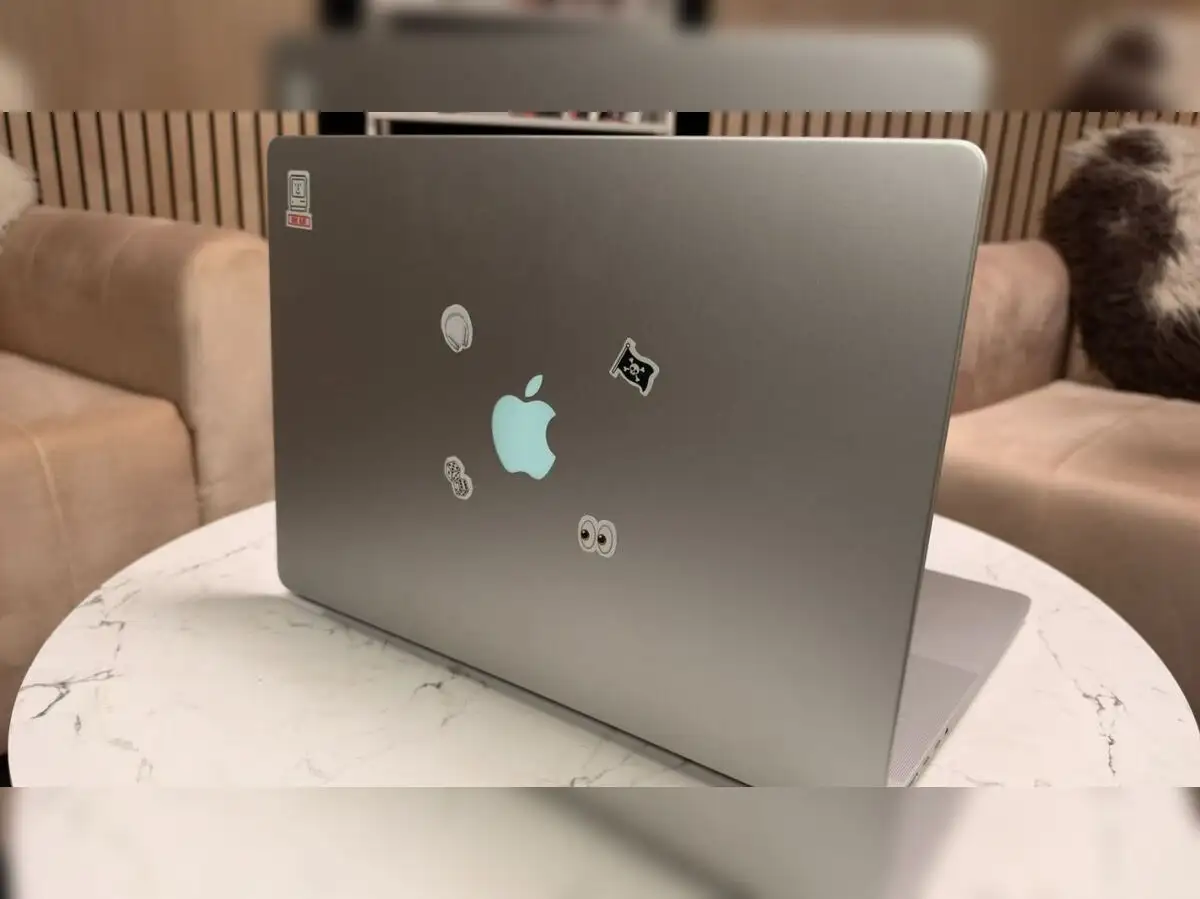
Apple launched its 16-inch MacBook Pro featuring a new touchscreen and vibrant PROLED XDR display. The laptop went on sale on November 6, starting at ₹4,09,900. While the touchscreen offers basic functions, the battery life impressed, lasting over 11 hours. It also brings back the iconic glowing Apple logo.
Apple has launched its latest 16-inch MacBook Pro, now boasting a sleek touchscreen and vibrant OLED display technology. Users migrating from the previous 14-inch model will appreciate the striking enhancements in performance and visuals. Although the touchscreen is mostly handy for basic functions, the battery life stands out, delivering over 11 hours of powerful usage, ideal for professionals engaged in video editing and creative tasks.
Apple has finally put a touchscreen on a Mac, and we were at the launch of the new MacBook Pro in Los Angeles. The 16-inch model pairs touch with a tandem OLED panel Apple calls PROLED XDR. We were coming from a 14-inch MacBook Pro with M1 Pro, so there were two things we wanted to find out. Would we reach for the screen once the novelty wore off? And would we still want to carry a 16-inch laptop after getting used to the extra screen space?
Price and availabilityThe 16-inch MacBook Pro with M5 Pro and PROLED XDR Display starts at ₹4,09,900 in India, or ₹3,85,900 with education pricing. It went on sale on November 6 through Apple and authorised resellers. The 14-inch M5 Pro model with the same OLED and touch technology starts at ₹3,49,900.
DesignMost of the design will feel familiar if you've used a recent MacBook Pro. The changes are in a few places you'll spot quickly. The notch gives way to an interactive cutout that works like the iPhone's Dynamic Island. And yes, the Apple logo on the lid glows again.
We initially thought the glowing logo wouldn't add much, and in terms of getting work done, it doesn't. But it's a nice callback to older MacBooks and sets this machine apart, even within Apple's own lineup. The novelty wears off, partly because you're on the other side of the lid when you're using it. For bragging rights, though, it gives this MacBook Pro something extra.
We were more concerned about carrying the 16-inch model. The first sign that it would take some adjustment came before we left the house. It wouldn't fit in our bag's laptop sleeve, so we had to put it in the main compartment. At 1.82kg, the weight was manageable. It's the space the laptop takes up that you notice coming from a 14-inch MacBook Pro.
You get three Thunderbolt 5 ports, HDMI, an SDXC card slot, MagSafe and a 3.5mm headphone jack. That covers most of what we'd plug in, but with a chassis this big, we would've liked an extra port over the 14-inch model. It's a nitpick, especially since we could plug in a display or pull footage off an SD card without reaching for a hub.
Display and touchComing from a 14-inch MacBook Pro, we found the 16.3-inch OLED noticeably more immersive. Films are an easy way to appreciate the bigger screen, but we liked it even more when making something ourselves. There's room for the preview, the timeline and the colour controls without constantly resizing panels. Colours looked accurate to us, and the OLED's deep blacks make darker scenes especially enjoyable to watch.
We've been using the latest Adobe Premiere Pro on this MacBook, including its new colour tools. Whether we were editing a longer video or putting together a short clip, the finished footage looked crisp and the colours stayed close to the source. That's where we appreciated the display most. We could make a colour adjustment, see what it did to the shot and keep working with the rest of the edit still in view.
Touch took longer to find its place. We wanted to use it more often than we actually did, and we rarely went looking for a reason to use it. Instead, it became muscle memory for the little jobs where moving the cursor felt like an extra step. If your cursor is on one side of a screen this large and the window you want to close is on the other, sometimes it's quicker to reach out and tap. We did the same to expand a frame or tweak a setting.
On a typical seven-hour day, we probably spent about 20 minutes using touch in total. That went up when we edited video or made a thumbnail. Twenty minutes sounds small, but those were moments when it made the job easier. It's also why touch makes more sense to us on the 16-inch model, where there's simply more distance for the cursor to travel.
Perhaps Apple expected touch on the Mac to be something we'd use in short bursts. That's largely how we used it, and the new MacBook Pros don't support the Apple Pencil. We think Pencil support would give us more reasons to reach for the screen. Marking up a document, sketching a thumbnail or making a precise selection in a photo are all jobs where a pencil would be more useful than a finger. Maybe Apple will bring it to a later model. We'd like to see what that does to our 20 minutes a day.
Another surprise element for us is the missing Face ID interface here. With the addition of face unlock in the new iPhone Duo, we can expect a face unlock here as well eventually. This MacBook even today is dependent only on touch ID, which is secure and definitely fast, but having a face unlock as an option would be appreciated as an option.
The speakers left us a little underwhelmed. They get loud, but we expected more depth and bass from a laptop this size. We would've been happy with that sound on a 14-inch MacBook Pro. On the 16-inch, especially when watching a film on a screen this good, we wanted a bit more from the audio. It's a minor letdown.
The camera was a better surprise. Video calls looked better than on the 14-inch MacBook Pro we came from, even in low light. We also record some of our work over Zoom, so we used the built-in camera for that as well. The footage held up well for the recording itself, which matters more to us than how sharp we look in the little preview window during a call.
Software and Siri AIThe MacBook Pro runs
macOS 27, and the bigger screen changed how often we used iPhone Mirroring. On the 16-inch model, there's room to keep the phone window beside whatever we're working on. You can also drag a corner to resize it. It's easier to check something in an iPhone app and get straight back to an edit when you can see both at once.
The smaller conveniences still matter. AirDrop gets photos and footage onto the Mac, Universal Clipboard lets us copy a link on the iPhone and paste it into a document on the laptop, and Handoff makes it easy to pick up a webpage where we left off. With Mirroring, we can also get to an app on the phone without taking our hands off the Mac.
Siri AI and the updated Spotlight search both felt genuinely useful. Spotlight is the quicker choice when you know what you want. You can find a file, narrow the results by file type or even launch an iPhone app in Mirroring. Siri AI makes more sense when the request is less exact. If you remember someone sending you a reference but can't remember whether it was an email or a message, you can ask for it in those terms. It can also use what's already on your screen as context. Siri AI is still in beta, but there's enough here to see where it fits into a normal workday.
The MacBook Pro has always been about getting a lot of work done. This one takes that a step further by making it easier to stay with the work in front of you. You can leave the edit open, bring up a reference from the phone and find the next file through Spotlight without rearranging your workspace each time. That's where the larger display and the software come together, and it's a difference we felt more often than we expected.
Performance and battery lifeMoving from the M1 Pro we'd been daily-driving to the M5 Pro was a jump across several generations. We felt it throughout our workflow, from editing 4K footage to keeping other apps running while a project exported. We expected the new MacBook to be faster. What stood out was how often the extra power let us skip a step or get on with something else.
Premiere Pro made the difference easiest to measure. We edited a 10-minute 4K clip without creating proxies, and the final export took less than four minutes. On our M1 Pro, an export of that length could take up to 12 minutes. Saving those minutes on the final export is welcome, but it matters even more when you spot a change, make it and have to export the whole thing again.
Our review unit has 48GB of unified memory and 1TB of internal storage. The extra memory gave us room to leave Premiere Pro and our other work apps open at the same time. The 1TB SSD meant we could keep active footage and project files on the Mac itself, which is how we prefer to edit.
The memory crisis is part of the backdrop to what these machines cost, and there's still a lot to spend upfront. We also tend to look at a MacBook as a five-to-seven-year purchase, sometimes longer. Coming from an M1 Pro that served as our daily machine for years, it's easier to justify the investment when the time savings show up in work we do every week.
AI use caseWe've been using Codex throughout the workday for general tasks and parts of our video-editing workflow. It ran comfortably in the background while we continued working in Premiere Pro and other apps. For us, the quality of the output comes first. The benefit of the Mac was being able to leave a task running, get on with the edit and come back to the result without the rest of the workflow feeling held up.
If you want to run AI models natively on the Mac, 48GB of unified memory gives you room to choose a model for the job and keep working in other apps. The quality of what comes back still depends on the model and the task. Our use is primarily that of a creator, and we'd judge this configuration on how comfortably it fits into that workflow.
We did try an app development project of our own. Using Codex on the M5 Pro, we built a simple Android app for wallpapers and a clock. The build went smoothly, and the resulting APK worked well in our testing. It was a small project, but it gave us a useful look at the full workflow, from putting the app together to building and testing something we could actually install.
Battery life
The MacBook regularly went well over a day between charges in our use, with more than 11 hours of screen-on time and several apps running in the background. That made it easier to work away from a plug without spending the day thinking about what we had open.
The charger is the part we liked less. It's heavy enough that we had to be mindful of where we plugged it in. A loose wall socket or a crowded power strip can make it awkward to keep the adapter seated securely.
VerdictWe went in curious about touch and came away appreciating the screen most. The extra space made a difference when watching films and again when we opened Premiere Pro to make something. Touch earned its place in smaller ways, mostly by saving us a trip across the screen to do something simple.
At ₹4,09,900, the case for this MacBook comes down to how often you'll use that screen and how much time the M5 Pro can save you. Coming from our M1 Pro, the shorter exports, room to keep apps running and strong battery life made this feel like a substantial upgrade. If you're already shopping for a 16-inch MacBook Pro and the price gap to the touch model is manageable, the OLED is a reason to consider it even if you only end up tapping it for 20 minutes a day. Just check your bag first.