
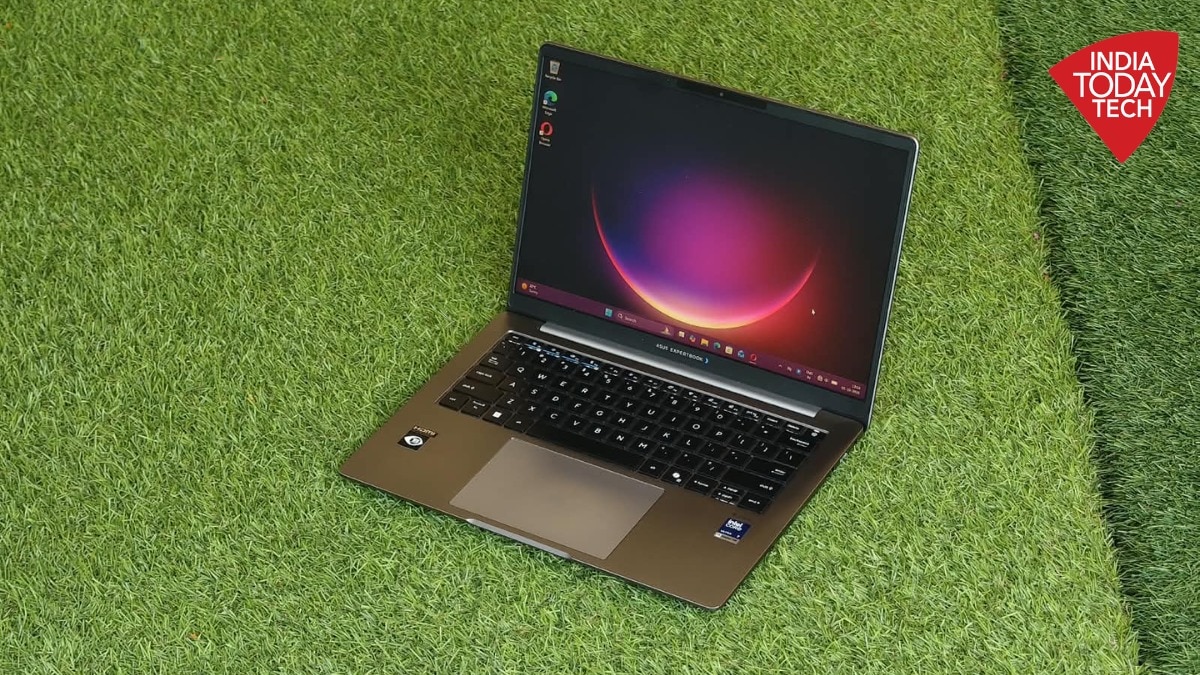
The Asus ExpertBook P5 (2026) launched at a starting price of Rs 2,14,900. This premium laptop features an all-aluminium build and weighs 1.36kg. It got a refresh to help enterprise users handle daily AI tools. Many ports are included, and the hinge allows the device to open up to 180-degrees.
Laptops are machines that often get overlooked. More often than not, you may want your laptop to just do the job and blend into the background. But even providing such an experience is not easy - the laptop must be able to handle everything effortlessly. The Asus ExpertBook P5 got a refresh this year, and the device wants to fit into your life while still delivering a premium experience for enterprise users. Of course, in 2026, many of us are using AI tools on a daily basis. And Asus has taken note, but we will get to that later.
At a starting price of Rs 2,14,900, the Asus ExpertBook P5 series wants to deliver exactly that - a work laptop that does everything you need seamlessly. India Today Tech spent some time with the ExpertBook P5 - P5405CAA in particular - and here are our thoughts.
Design and build
The ExpertBook P5 is a premium device and it feels like one too. You get an all aluminium build that feels well worth the price. The laptop gets a matte finish which does not pick up smudges or fingerprints easily. And you can open the lid - which has the Asus logo at the centre - with one hand, something you expect in this segment. There is a sculpted portion at the bottom half of the laptop from where you can lift the lid.
The Asus ExpertBook P5's 14-inch model that we have here weighs about 1.36kg. In day-to-day use, the laptop does not feel bulky, and you can move with it from one place to another - for example, go for a meeting. While the body of the laptop feels quite sturdy, you do notice that the lid does move a bit if you are moving around a bit aggressively.
However, the hinge can open up to 180-degrees. This allows you to keep the laptop flat on a table, which could be useful during meetings. The speaker setup is placed on the rear, but more on that in a while.
You also get a bunch of ports on the ExpertBook P5 including 2 Thunderbolt 4 USB-C ports - which also support charging - as well as 2 USB 3.2 ports, 1 HDMI port and a full-size RJ-45 Ethernet port. There is also a 3.5mm audio jack and a Kensington nano lock slot. This package allows you to use the laptop without having to worry about using an external dongle, and that is good to see.
Keyboard and trackpad
The typing experience on the ExpertBook P5 is quite smooth. The laptop gets a 1.5mm key travel - how far the keys go downwards when you press - combine this with a key dish of 0.2mm - the amount the keys are curved inwards - and the typing experience feels quite enjoyable. You get the satisfying click sounds if you are particularly aggressive with the keyboard.
The keys are also placed at a decent distance from one another - a key pitch of 19.05mm. This means that I rarely found myself making typos or pressing the wrong key. The trackpad is smooth and seamless to use.
Coming back to the keyboard. It is backlit with three different brightness levels. You can manage this via the F7 shortcut key or even turn it off entirely. If you are like me who ends up staying up late in a dark room trying to finish work - like this review you are reading - you shouldn't have any problem while typing on the ExpertBook P5.
As always, there are a bunch of shortcuts on the keyboard too, including one to switch off the mic and the Copilot key. The fingerprint sensor is placed on the top right, and it works just as you'd expect.
Display and sound
From the part of the laptop your fingers interact with to the part that you will see, let's come to the Asus ExpertBook P5 display. The P5 variant we have comes with a 14-inch 2.5K IPS panel with an anti-glare coating and 400 nits of brightness. It has a 16:10 panel aspect ratio. You don't get touch support though.
As far as IPS panels go, the display is quite good, the colours are punchy, and there is no blueish tint either. The screen covers 100 per cent of sRGB colour gamut, so you can do some editing work here too.
I found the anti-glare coating to be particularly useful. You barely notice reflections on the display, even while sitting near a window at noon. However, in such scenarios, the 400 nits of brightness does leave you wanting for more.
Indoors, you face no real issues with the brightness, and the anti-glare coating does not interfere with colour accuracy either. You can play 4K videos on YouTube with HDR and the experience is immersive. The colours pop out and you get deep blacks too. But of course, it cannot match the colours of an OLED panel.
The Dirac-branded stereo speakers, meanwhile, are placed at the bottom. The speakers can get really loud with good clarity. That is, if you are having a meeting without headphones or just watching a livestream of a conference.
While we are at it, the ExpertBook P5 comes with a 5-megapixel IR webcam on the front which gets a privacy shield to cover it when not in use. The webcam supports Windows Hello login, or face unlock in simpler terms. Windows Hello does work quite fast for the most part, though in low light things do get a bit slow.
The webcam also gets Microsoft's studio effects, such as background blur. It can also keep you at the centre of the frame during a video call even if you move a bit. It is a 1080p camera, and the image quality is like what you'd expect with similar webcams. You get AI noise cancellation for the mics for video calls. If you want, you can also enrol your voice to the mic so that it only detects when you speak during a meeting, something that can be quite useful for some.
Performance and AI
The Asus ExpertBook P5 is designed for productivity and business use cases. Under the hood, our unit comes with the Intel Panther Lake Ultra 7 356H processor. This is paired with 32GB of LPDDR5 RAM and a 1TB NVMe Gen 4 SSD. The Panther Lake processor delivers performance up to 35W, and it is paired with Intel integrated graphics.
What this means in the real world is that the ExpertBook P5 can handle your daily tasks with ease. The laptop takes just under 40 seconds from boot-up to loading the desktop, which is quite quick. You also get Windows Hello support for the lockscreen, apart from the fingerprint sensor we mentioned earlier.
Once you start using the ExpertBook P5, everything happens quite smoothly. For someone who keeps at least a dozen tabs open at all times, using the laptop was almost a breeze. Be it scrolling through different tabs and windows, or even playing a 4K video on the side, the laptop has no issues.
Even when I tried to push the laptop further by editing photos, running desktop apps, and keeping tabs open - like you would on a busy workday - it was able to keep up effectively. And all of this can happen throughout a workday, without any major throttling in performance.
As I mentioned earlier, Asus has focused on AI here. You get Copilot just like other Windows 11 PCs, giving you access to the AI tool for research or even image generation. Asus says the ExpertBook P5 has a neural performance of 50 TOPs or about 50 trillion AI operations per second. This gives you ample power for running AI models on-device for tasks like coding.
Though the Asus ExpertBook P5 is not designed for heavier tasks like video editing or gaming. There is no dedicated graphics card so don't expect much out of the machine. But then again, it was not designed for such use cases.
When it comes to benchmarks, the ExpertBook P5 scores 2,412 points in single-score and 12,361 points in multi-core on Geekbench 7. On Cinebench, the laptop scores 438 points in single-thread CPU test.
Battery life and charging
While the Asus ExpertBook P5 can deliver decent performance when it comes to work tasks, it does fall a bit behind in terms of battery life. The laptop gets a 63Whr battery and comes with a 65W USB Type-C charger. However, it supports up to 90W fast charging via PD or PPS adapters.
Asus says you can get up to 18 hours of video playback from the ExpertBook P5 series. Now, as is the case, video playback does not translate completely to multitasking or heavier workloads. However, I found that usually, my laptop would reach 20 per cent in about 5 hours during a workday.
My workload usually included a lot of browsing, typing documents, and having multiple tabs open at the same time. Though I did keep the backlit keyboard on for almost the entire time. Now this is not bad battery life, but it does mean that you would need to look for the charger everyday at work. But if you have a two-hour flight for instance, the ExpertBook P5 will manage to last the entire flight and some more just fine. In terms of charging, the laptop does top up quite quickly, usually around an hour.
Should you buy it?
So where does that put the Asus ExpertBook P5? The laptop is designed for productivity, and it caters to those who want their device to be a reliable workhorse. For this, you get a sleek build that makes it fairly portable. The screen, while it is not an OLED, has a nice matte-finish, saving you from glares during the day, and the colours look decent too.
More importantly, the keyboard is almost a joy to use and many will like to type on it on an everyday basis. The performance is also plenty for work tasks including on-device AI, meetings, presentations, and the usual web scrolling. But there are some quirks, the battery life is not impressive, and the lid doesn't feel as sturdy as it should be for a laptop at this price. But for enterprise customers who want a laptop for workers that just blends in, the ExpertBook P5 could be a decent option to consider.